POV-Ray Program by Jay Tanner - 2025
Rotating the Camera/Eye (Equatorially Only)
-
Similar to Grimaldi demo 1, here is another example of centering on Grimaldi, the dark basin seen near the western limb of the lunar disc. The difference is that the moon itself is being rotated equatorially to bring the longitude of Grimaldi near to the center of the view. The camera location remains fixed.
To follow along in LUNEX, make a copy of the template file:
DEFAULT-SCENE-TEMPLATE.pov
Then, rename that copy to:
Grimaldi-demo-2.pov
All subsequent changes in the copy will be made to and replace the default settings to render the new scene.

We start with the default geocentric full moon.
From the 'Lunar Craters Sorted by Name' table we find the coordinates of Grimaldi.#declare CamLat = -5.5; // Grimaldi #declare CamLon = -68.3; // 172 km (106 mi) Near Side W
In this case, we only need the longitude, which we find to be−68.3degrees (W), so we then rotate the moon by−68.3degrees to bring Grimaldi very close to the center of the view. All we are doing here is simply rotating the moon equatorially to vertically align the center of the disc with the longitude of Grimaldi. The camera or eye does not change location, only the moon's orientation relative to the eye is adjusted.// ---------------------------------------------- // Lunar equatorial rotation angle. +Clockwise #declare MoonRotAngY = -68.3; // Longitude of Grimaldi
It is similar to being in space viewing Grimaldi nearly from above because this view of Grimaldi is not physically possible from Earth.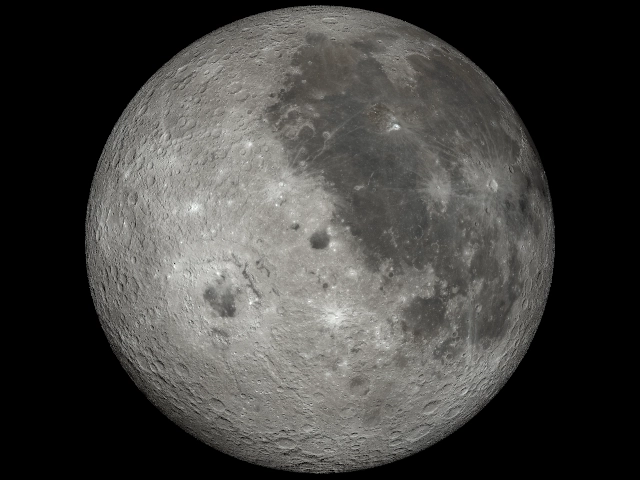
Here is the view centered on longitude−68.3degrees (W), the longitude of Grimaldi,
the dark spot (or basin) near the center of the view and slightly below the equator.